Give Every Student Actionable Writing Feedback

Create open-ended writing prompts, let students type or upload handwritten work, and choose how feedback and grading are handled.
Dashboard mockup

You're in Control of Every AI Decision

Accept Typed Responses or Handwritten Work

Students can type a response or upload an image or PDF. Both are supported, graded, and get the same feedback on submission.

Write Any Prompt, Attach Any Media

Write your prompt and add context students need, like an image, audio clip, video, or link. Use AI Context to add background for the grading model.

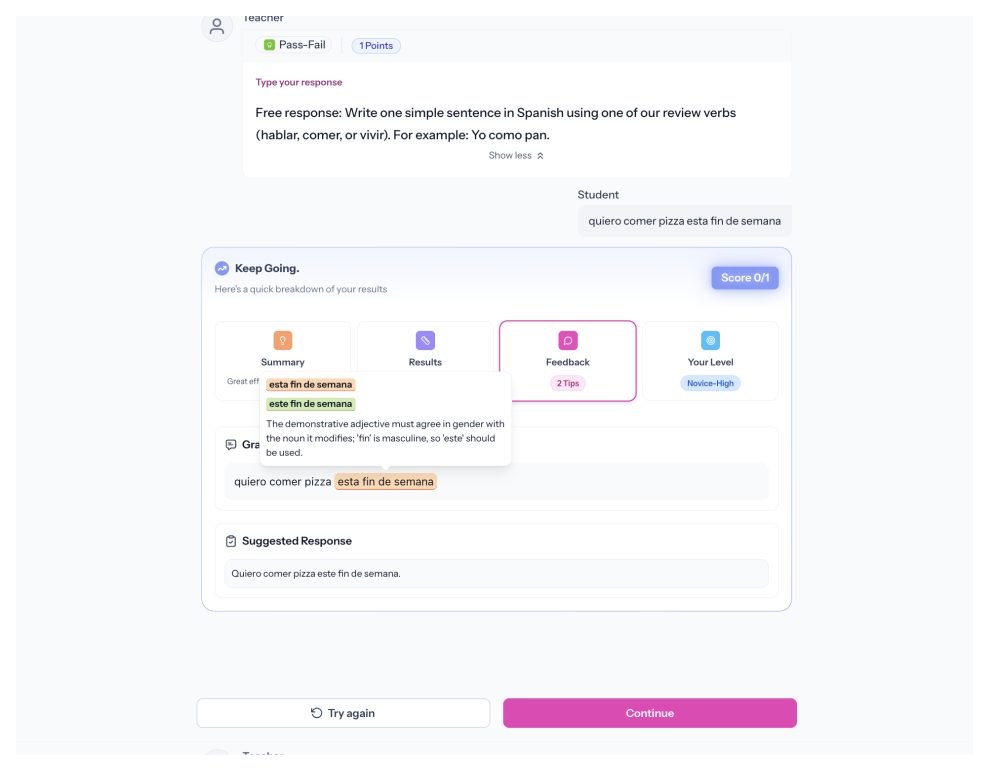
Turn On Instant Feedback, or Leave It Off

Instant feedback is optional. If you turn it on, choose what students see: grammar insights, a suggested response, a proficiency level estimate, or any combination. Feedback matches your standard and appears in the student's native language.

Grade Automatically, or Manually

Automatic grading is optional. If you turn it on, choose a method: Pass-Fail, Standards-Based, or Rubric scoring. Each one grades as students submit.

“With Speakable, feedback is now FULL POWER. Within 24 hours of posting my first assignment, 8 students came up to me, completely unsolicited, to tell me how much they ENJOYED that assignment.”

Emily H.
Teacher & Content Producer
How it works

Build Once. Every Student Writes.

Create Your Prompt and Settings

Write your prompt, attach media, and choose AI options. Set feedback, grading, and response controls per activity.

Students Write or Upload

Open what AI generated in the Speakable builder. Chat with AI to make edits, adjust the rubric criteria, tweak the activity structure, or regenerate the audio or image until it's right.

Assign to Students

Everything stays inside Speakable. Assign the activity to your class in two clicks. Students get a complete, engaging experience, not a copied-and-pasted worksheet.

FAQs

Is AI feedback required?
No. Instant feedback is optional. Assign Written Open Response with no AI feedback, or turn it on and choose which types students see.
Is automatic grading required?
No. Grading is optional. Grade manually or not at all. If you turn on automatic grading, choose Pass-Fail, Standards-Based, or Rubric.
Can students upload handwritten work?
Yes. Students can upload an image or PDF instead of typing. Both paths are graded and get the same feedback options on submission.
What feedback types can I give students?
Grammar insights, a suggested response, and a proficiency level estimate. Toggle each one to fit the activity.
What languages and proficiency standards are supported?
Speakable supports 40+ languages. Feedback can appear in the student's native language. Standards include ACTFL, WIDA, TELPAS, ELPAC, CEFR, and more.
Can I use Written Open Response for formal assessment?
Yes. Configure feedback and grading to control what students see during and after submission. Written Open Response works for practice and graded assessment.

You Set the Parameters. AI Delivers Instant Feedback.

Every student deserves feedback on written language. Written Open Response delivers it without adding hours to your week, and without taking control away from you.